
Cycloid changelog
Environments & Cloud Accounts
New Feature
v6.10.29

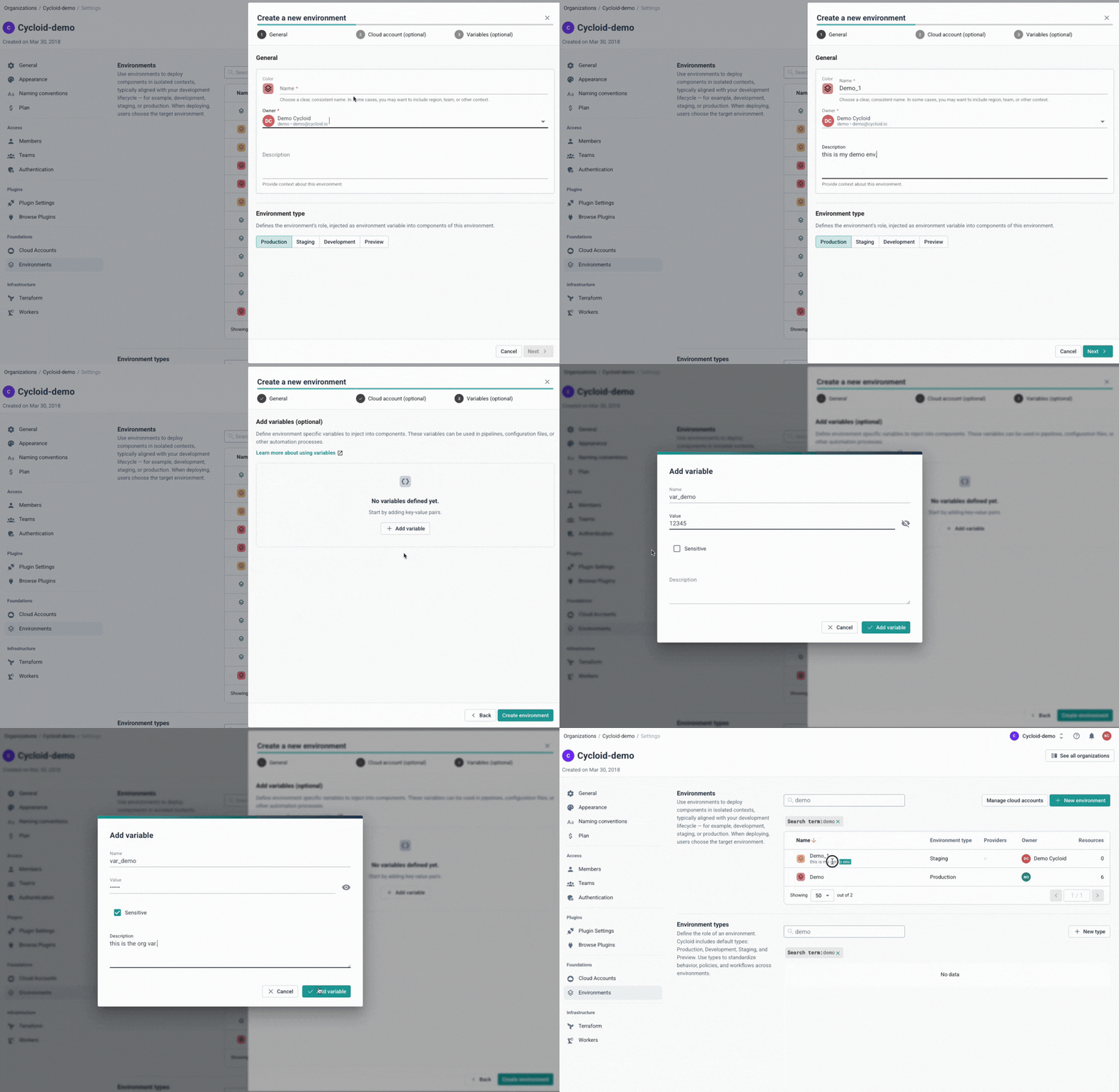
Until now, environments in Cycloid were a per-project concern. Each project created, named, and managed its own. That worked, but it meant no shared catalog, no org-level visibility, and no way for a platform team to define a deployment target once and make it available everywhere. Today, we're changing that with the release of org-level Environments and Cloud Accounts.
This isn't just a UX improvement, it's a fundamental shift in how your organization governs its deployment landscape!
❓The "Why": From free-for-all to structured governance
Environments and Cloud Accounts now live at the organization level, defined once by your platform team and shared everywhere. Projects no longer create environments locally; they pick from the org-wide catalog instead:
Single source of truth: One
prod-euenvironment — complete with its AWS credentials, region variables, and IaC state backend — shared across every project that needs it.Real governance: Org admins control what exists. Projects simply link from the catalog — they can no longer create, rename, or delete environments locally.
No more credential roulette: Cloud credentials are scoped to a Cloud Account entity and linked to an environment. End users select the environment they have access to — they never need to touch the credential layer directly.
Simpler StackForms: Variables and credentials inherit from the environment automatically, so stack authors don't have to ask users to configure things that the platform already knows.
💡 From platform teams to end users: the full picture
The Platform Team Handoff: Your platform team defines
prod-eu,staging-eu, anddevonce, with the right AWS credentials and region variables pre-baked. Every new project your developers spin up can link those environments in seconds — no setup, no credential hunting.Multi-Project Credentials: Attach your AWS account to
prod-euonce. Any pipeline or StackForm in any project linked to that environment can reference the credentials via Cycloid's templating system — no raw access keys scattered across your config files.Ephemeral PR Environments: Create a custom
ephemeralenvironment type for per-PR deployments. Stack authors can branch their pipeline logic onenvironment_typeto use lighter-weight behaviour automatically for short-lived envs.FinOps Without the Setup Tax: Enable FinOps & GreenOps directly on your Cloud Account. Cost and carbon data starts flowing into your Cloud Cost Management dashboards without any separate account configuration.
Terraform-Managed Foundations: Use the cycloidio/cycloid Terraform provider (v0.7.0+) to declare your entire environment catalog as code. One
terraform applyprovisions your org's full environment structure, reproducibly.
✨ What’s the full feature breakdown?
Org-level Environment catalog: Create and manage all environments from Org Settings → Foundations → Environments. Projects link from the catalog — they can no longer create, rename, or delete environments locally.
Cloud Accounts: Connect AWS, GCP, Azure, or custom key-value credential sets at the org level and attach them to one or more environments. Each environment can hold credentials for multiple providers simultaneously.
Environment Types: Four built-in types (production, staging, development, preview) ship with every org. Add custom types — like
qaorephemeral— when your classification needs go further. The type flows into StackForms and pipelines as theenvironment_typevariable.Environment Variables: Pre-set key-value variables (including secrets) directly on an environment. Region codes, feature toggles, internal URLs — set once, inherited by every component inside.
IaC State Management overrides: Configure a dedicated Terraform state backend per environment, overriding the org-level default where you need it.
CLI & Terraform support: Full
cy environment,cy cloud-account, andcy environment-typecommands, plus Terraform resources, for teams who manage infrastructure as code.
🚀 Ready to set it up?
If you were already using Cycloid, your existing environments have been migrated automatically to the org-level catalog — no action needed. Org admins can reclassify any environment from its settings page if the inferred type doesn't fit.
For new orgs or a fresh setup, the cookbook walks you through the full flow in minutes.
👉 Dive into the Environments & Cloud Accounts documentation today!
MORE on Changelog v6.10.29
ADDED
Environments: Component outputs are now surfaced as prominent call-to-actions on the component overview — stacks show direct links to what was just deployed or created
StackForms: Forms can now conditionally show or hide groups, fields, and dropdown options based on the current user's identity, team membership, and role
CHANGED
Components: Component setup has been split into dedicated pages for a clearer configuration experience
Plugins: The logs viewer now auto-scrolls to the latest entries; manual scroll position is respected
FIXED
StackForms: Fixed an error when saving a form with a required dropdown field using label/value mapping
StackForms: Resolved an issue where components using JWT-based external backend tokens were created with an unresolved
<no value>placeholder instead of the correct token.Docker: Container images now support arbitrary non-root UIDs, fixing permission errors on OpenShift and restricted Kubernetes environments